

双栈 ClusterIP 配好了,IPv6 就是不通——少加载了一个内核模块
场景:集群升级双栈后,Service 的 IPv6 ClusterIP 永远连接超时、IPv4 正常——不是配置错了,是 kube-proxy 的 ip6tables 规则压根没写进去 路径:坐标(双栈 Service 创建 + IPv6 超时症状)→ 分层(Pod 内 DNS → Service 配置 → kube-proxy 规则 → Node 内核模块)→ 路径(3 条排查命令定乾坤)→ 定位(iptables 正常 ≠ ip6tables 正常)→ 标点(加载模块 + Check-list) K8s 版本:v1.28,kube-proxy iptables 模式,Calico v3.27
上篇讲了双栈 Service 的 ipFamilies 顺序会把一个协议族降级成"备选地址"——写错了顺序,IPv4 就成了二等公民。这次的问题方向不同:ipFamilies 写对了,两个 ClusterIP 都分配了,但 IPv6 的 ClusterIP 永远连接超时。
一个 Service 配了 ipFamilyPolicy: RequireDualStack,kubectl get svc -o yaml 显示两个 ClusterIP 都已分配。从 Pod 里 curl IPv4 ClusterIP 秒回、curl IPv6 ClusterIP 卡到超时——"CNI(Container Network Interface,容器网络接口,负责为 Pod 分配网络地址)不支持双栈?""路由没配?"都不是。问题在 kube-proxy(K8s 集群网络代理组件,负责将 Service ClusterIP 的流量转发到后端 Pod)的规则同步:iptables -w 5 -t nat -L 有 KUBE-SERVICES 链,ip6tables -w 5 -t nat -L 直接报错。不是配置错了——是 ip6table_nat 内核模块压根没加载。
金句:双栈不只是改个 YAML 字段——是两个独立协议栈的规则同步,缺一个内核模块,kube-proxy 忙活 30 秒然后认输。
【坐标】IPv4 通、IPv6 不通
Layer 1 — 结论前置:双栈 Service 配完后 IPv6 ClusterIP 连接超时,不是 CNI 问题,是 kube-proxy 没生成 IPv6 方向的 DNAT 规则。
部署背景
| 部署项 | 配置 |
|---|---|
| 消费方 | Pod web-frontend,Namespace prod,10.244.1.15 |
| 目标服务 | order-svc.prod:8080,HTTP |
| Service 类型 | ClusterIP,ipFamilyPolicy: RequireDualStack |
| 网络插件 | Calico v3.27(双栈模式) |
| 集群版本 | K8s v1.28,kube-proxy iptables 模式 |
| 集群 IPv4 范围 | --service-cluster-ip-range=10.96.0.0/12 |
| 集群 IPv6 范围 | --service-cluster-ip-range=2001:db8:1::/48 |
Service YAML:
apiVersion: v1
kind: Service
metadata:
  name: order-svc
  namespace: prod
spec:
  ipFamilyPolicy: RequireDualStack
  ipFamilies:
  - IPv6
  - IPv4
  selector:
    app: order
  ports:
  - port: 8080
    targetPort: 8080
Layer 2 — 证据展开:
kubectl get svc -o yaml确认两个 ClusterIP 都已分配。
$ kubectl get svc order-svc -n prod -o yaml | grep -E 'clusterIP:|clusterIPs:'
  clusterIP: 2001:db8:1::14
  clusterIPs:
  - 2001:db8:1::14
  - 10.96.1.20
kubectl get svc -o wide 只显示主 ClusterIP(IPv6),副 ClusterIP(IPv4)需要通过 -o yaml 查看。IPv4 ClusterIP 10.96.1.20 和 IPv6 ClusterIP 2001:db8:1::14 都已分配。从 Pod 里分别测试:
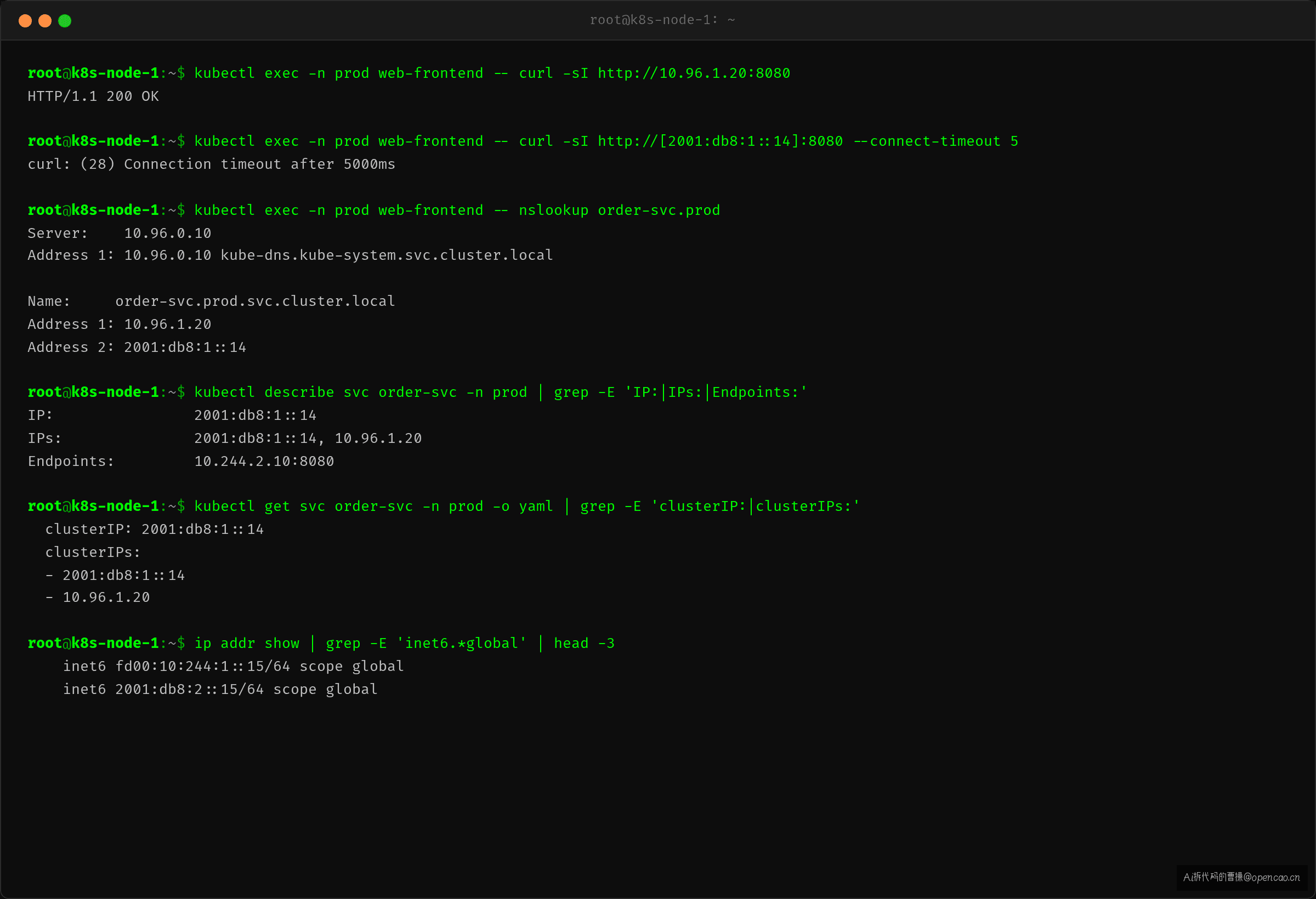
IPv4 秒回、IPv6 超时,DNS 解析都正常。
Layer 3 — 衔接:ClusterIP 已分配、DNS 已解析、就是连不上。问题不在 Pod 也不在 Service 配置——是流量到了 Node 之后,没人做 DNAT(目标网络地址转换,kube-proxy 通过 DNAT 将 ClusterIP 流量转发到后端 Pod)。
【分层】Pod → kube-proxy → 内核模块
排查顺序表:不跳层,从最上层逐级往下。
| 层 | 排查对象 | 命令 |
|---|---|---|
| 1 | Pod 内 DNS | kubectl exec <pod> -- dig +short order-svc.prod A order-svc.prod AAAA |
| 2 | Service 配置 | kubectl describe svc order-svc -n prod |
| 3 | kube-proxy 规则 (IPv4) | iptables -w 5 -t nat -L KUBE-SERVICES -n -v \| grep <clusterip> |
| 4 | kube-proxy 规则 (IPv6) | ip6tables -w 5 -t nat -L KUBE-SERVICES -n -v 2>&1 \| grep <clusterip> |
| 5 | Node 内核模块 | lsmod \| grep ip6 |
Layer 1 — Pod 内 DNS 解析
$ kubectl exec -n prod web-frontend -- bash -c 'dig +short order-svc.prod A; dig +short order-svc.prod AAAA'
10.96.1.20
2001:db8:1::14
两个 ClusterIP 都解析到了。DNS 没问题。
Layer 2 — Service 配置
$ kubectl describe svc order-svc -n prod
Name:              order-svc
Namespace:         prod
Type:              ClusterIP
IP Families:       IPv6,IPv4
IP:                2001:db8:1::14
IPs:               2001:db8:1::14, 10.96.1.20
Port:              <unset>  8080/TCP
TargetPort:        8080/TCP
Endpoints:         10.244.2.10:8080
Service 配置正常,Endpoints(记录 Service 后端 Pod 地址的资源对象)有后端 Pod。
Layer 3 — kube-proxy IPv4 规则
在 Service 所在 Node 上执行:
$ iptables -w 5 -t nat -L KUBE-SERVICES -n -v | grep order-svc
    0     0 DNAT       tcp  --  *      *       0.0.0.0/0       10.96.1.20       /* prod/order-svc */ tcp dpt:8080 to:10.244.2.10:8080
IPv4 的 DNAT 规则正常——命中 10.96.1.20:8080 的 TCP 请求会被 DNAT 到后端 Pod 10.244.2.10:8080。
Layer 4 — kube-proxy IPv6 规则【发现点】
$ ip6tables -w 5 -t nat -L -n -v 2>&1
ip6tables v1.8.10 (legacy): can't initialize ip6tables table `nat'
Table does not exist (do you need to insmod?)
不仅找不到 KUBE-SERVICES 链——ip6tables 命令本身就无法连接 nat 表。不是规则没写,是内核模块没加载,ip6tables 根本不能用。
衔接:kube-proxy 在 dual-stack 模式下通过
ip6tables-restore管理 ip6tables 规则。如果所有 ip6tables 操作都报错——说明不是 kube-proxy 不写规则,是底层内核不支持。
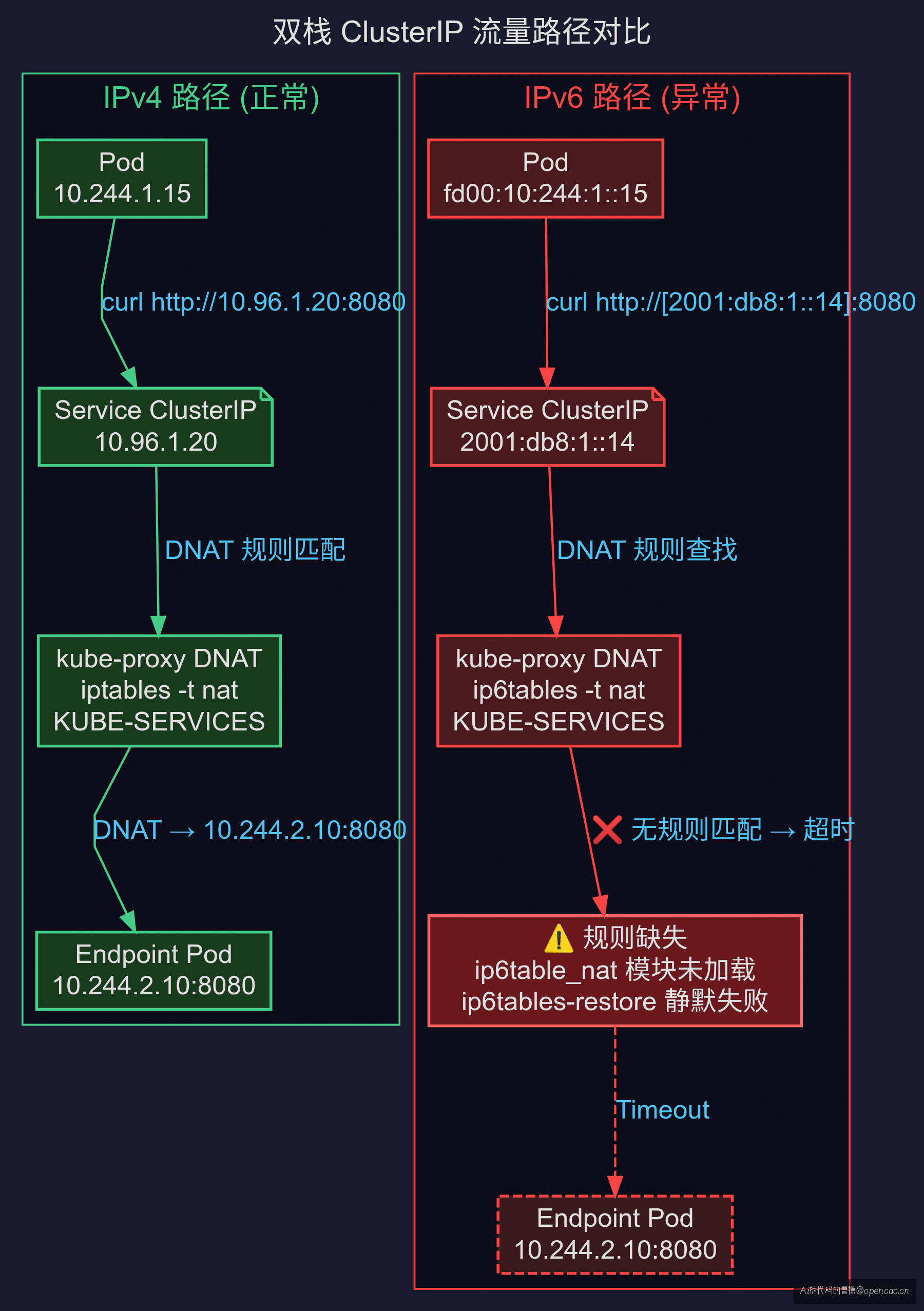
【路径】🔍 双栈 Service 排查先跑这三步
下次遇到双栈 Service 异常,按这个顺序排查:
# 1. 确认 Service 双栈 ClusterIP
kubectl get svc <svc-name> -n <ns> -o yaml | grep clusterIPs

# 2. 对比两张规则表(加 -w 5 避免与 kube-proxy 锁冲突)
iptables -w 5 -t nat -L KUBE-SERVICES -n -v | grep <clusterip>
ip6tables -w 5 -t nat -L KUBE-SERVICES -n -v 2>&1 | grep <clusterip>
# 注意:ip6tables 若直接报错而非返回空规则 → 内核模块缺失
# 应在检查规则前先确认 ip6tables 命令本身可用

# 3. 检查 ip6tables 内核模块
lsmod | grep ip6
# 应有:ip6table_nat、ip6table_filter、ip6_tables、ip6table_mangle
判断标准:
| 现象 | 问题 | 方向 |
|---|---|---|
| ip6tables 直接报错 | 内核模块缺失 | lsmod \| grep ip6 → modprobe ip6table_nat |
| iptables 有规则,ip6tables 返回空表 | kube-proxy IPv6 规则同步失败 | 查 kube-proxy 日志 + --cluster-cidr |
| ip6tables 有 KUBE-SERVICES,但缺特定规则 | IP 族偏好/顺序问题 | 查 ipFamilies |
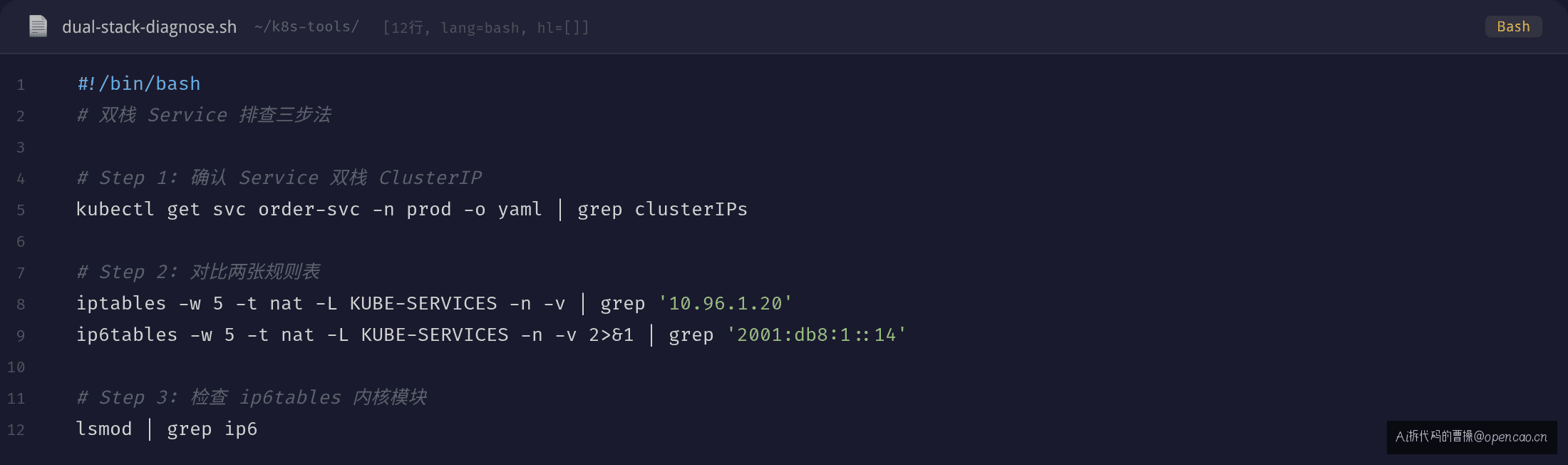
【定位】iptables 正常 ≠ ip6tables 正常
Layer 1 — 结论前置:双栈排查最大的盲区是"查了 iptables 就当查完了"——iptables 只看 IPv4,IPv6 的规则在 ip6tables 里。
❌ 大多数人会怎么查
看到 IPv6 不通:
1. 查 DNS → 解析正常 ✅
2. 查 Service → ClusterIP 已分配 ✅
3. 查 Pod → 运行正常 ✅
4. iptables -t nat -L → KUBE-SERVICES 有规则 ✅
然后陷入 "CNI 不支持双栈?""Node 间路由不通?"的猜测中,开始抓包、查路由表,越查越远。
✅ 正确的排查思路
iptables 和 ip6tables 是两套独立的规则表。kube-proxy 在 dual-stack 模式下必须同时写入这两张表。查完 iptables 必须查 ip6tables。
$ ip6tables -w 5 -t nat -L -n -v
ip6tables v1.8.10 (legacy): can't initialize ip6tables table `nat'
Table does not exist (do you need to insmod?)
根因:ip6table_nat 内核模块未加载。kube-proxy 调用 ip6tables-restore 时失败,日志里输出 Failed to execute iptables-restore,跳过本轮 IPv6 规则同步,30 秒后周期性重试。
原理点睛:ClusterIP 不在网络层,在 iptables 层——你抓包永远看不到 ClusterIP 报文,因为它到 Node 就被 DNAT 转走了。查双栈必须先确认 DNAT 规则在对应协议栈上存在。
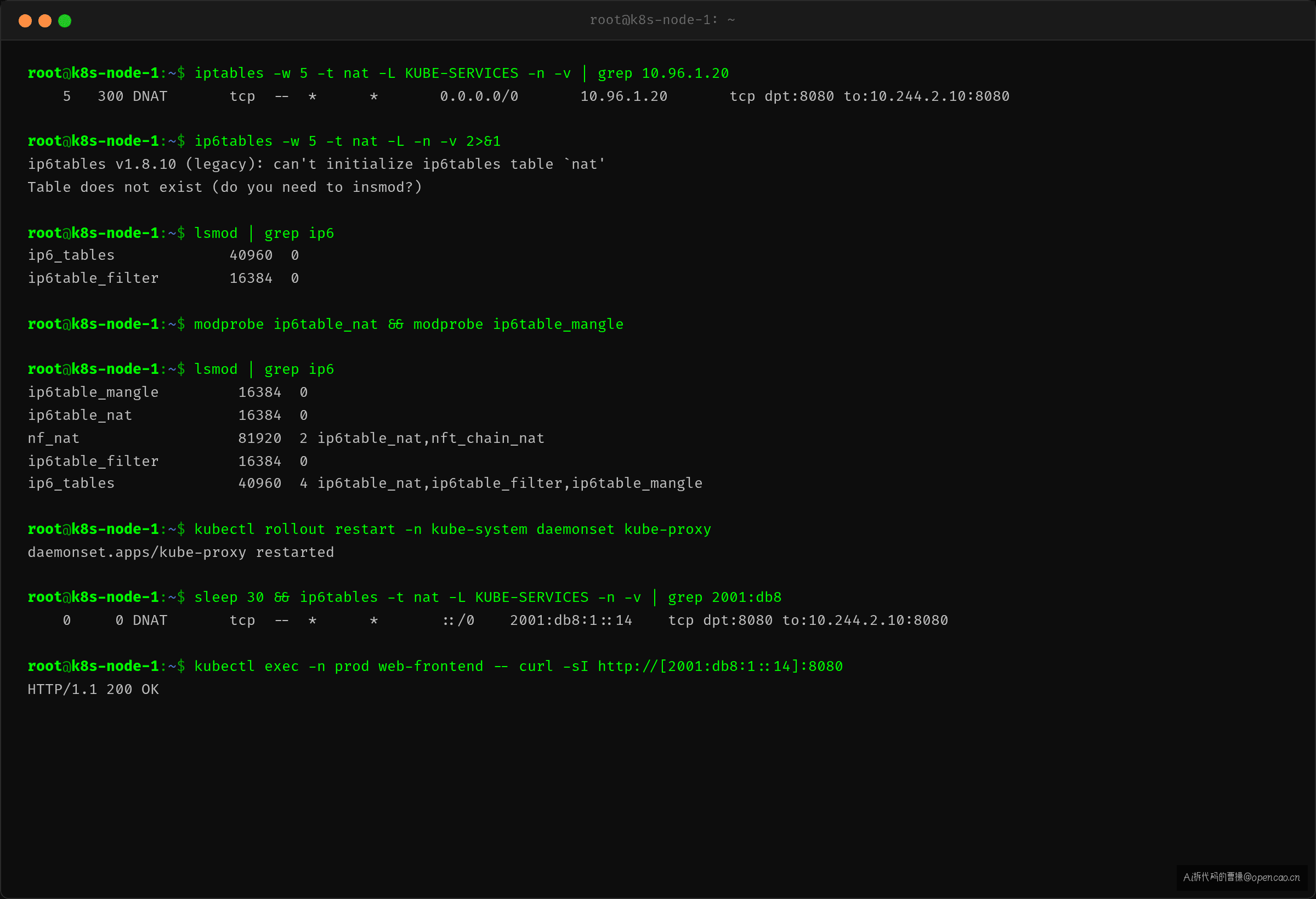
【标点】加载模块 + 重启 kube-proxy
Layer 1 — 结论前置:双栈需要 Node 内核加载
ip6table_nat等 ip6tables 模块,kube-proxy 才能写入 IPv6 NAT 规则。
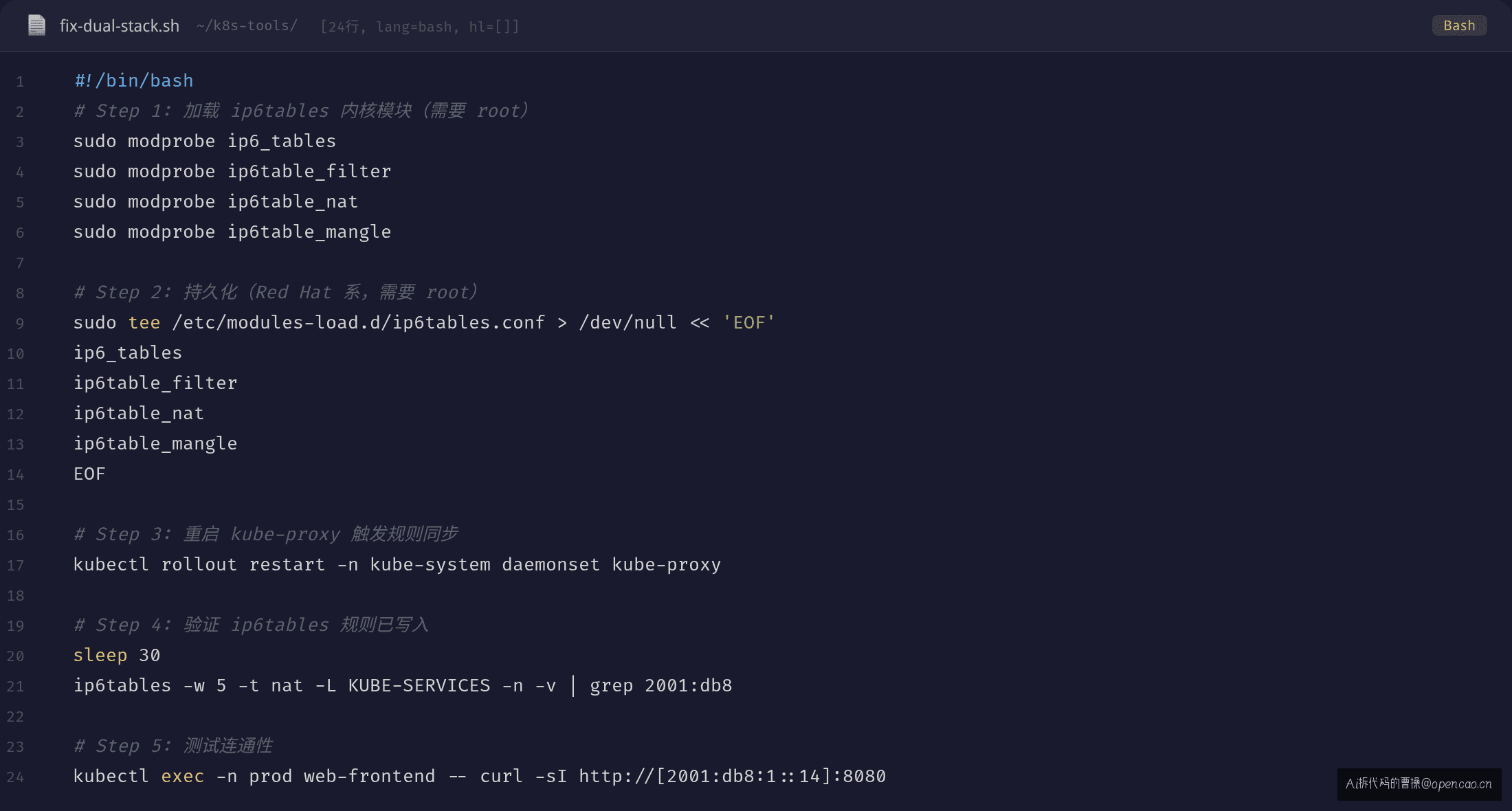
修复:Node 加载内核模块
在所有 Node 上执行:
# 1. 加载 ip6tables 相关模块
sudo modprobe ip6_tables
sudo modprobe ip6table_filter
sudo modprobe ip6table_nat
sudo modprobe ip6table_mangle

# 2. 持久化(不同发行版路径略有不同,需要 root)
sudo tee /etc/modules-load.d/ip6tables.conf > /dev/null << 'EOF'
ip6_tables
ip6table_filter
ip6table_nat
ip6table_mangle
EOF
验证加载:
$ lsmod | grep ip6
ip6table_mangle         16384  0
ip6table_nat            16384  0
nf_nat                  81920  2 ip6table_nat,nft_chain_nat
ip6table_filter         16384  0
ip6_tables              40960  4 ip6table_nat,ip6table_filter,ip6table_mangle
验证:kube-proxy 重新同步规则
# 重启 kube-proxy DaemonSet(确保集群中每个 Node 运行一个 Pod 副本的控制器,重启会触发所有节点重新同步规则)
kubectl rollout restart -n kube-system daemonset kube-proxy

# 等待 30 秒后验证 IPv6 规则
$ ip6tables -w 5 -t nat -L KUBE-SERVICES -n -v | grep 2001:db8:1::14
    0     0 DNAT       tcp  --  *      *       ::/0    2001:db8:1::14    /* prod/order-svc */ tcp dpt:8080 to:10.244.2.10:8080
可以测试连通性:
$ kubectl exec -n prod web-frontend -- curl -sI http://[2001:db8:1::14]:8080
HTTP/1.1 200 OK    # ✅ IPv6 通了
Check-list:双栈 Service 排查清单
每条对应一个命令:
# □ Service 双栈配置确认
kubectl get svc <svc-name> -n <ns> -o yaml | grep -E 'ipFamily|clusterIP'

# □ 确认 Node 已开启 IPv6 转发(不仅仅是 Pod 网络)
sysctl net.ipv6.conf.all.forwarding

# □ iptables 规则确认(IPv4)
iptables -w 5 -t nat -L KUBE-SERVICES -n -v | grep <clusterip>

# □ ip6tables 规则确认(IPv6)- 大部分人漏这步
ip6tables -w 5 -t nat -L KUBE-SERVICES -n -v 2>&1 | grep <clusterip>

# □ 确认 ip6tables 内核模块已加载
lsmod | grep ip6

# □ 检查 kube-proxy 日志是否有 ip6tables 报错
kubectl logs -n kube-system -l k8s-app=kube-proxy | grep -i 'ip6\|error\|fail'

# □ 双栈 Pod 内连通性验证
kubectl exec -it <pod> -- curl -sI http://<ipv6-clusterip>:<port>
附:完整命令清单
# === 诊断阶段 ===

# Service 双栈 ClusterIP
kubectl get svc <svc> -n <ns> -o yaml | grep clusterIPs

# iptables DNAT 规则(IPv4)
iptables -w 5 -t nat -L KUBE-SERVICES -n -v | grep <clusterip>

# ip6tables DNAT 规则(IPv6)
ip6tables -w 5 -t nat -L KUBE-SERVICES -n -v 2>&1 | grep <clusterip>

# 内核模块检查
lsmod | grep ip6

# kube-proxy 日志
kubectl logs -n kube-system -l k8s-app=kube-proxy | grep -i 'ip6\|error\|fail'

# === 修复(需要 root) ===

# 加载模块
sudo modprobe ip6_tables ip6table_filter ip6table_nat ip6table_mangle

# 持久化
echo -e "ip6_tables\nip6table_filter\nip6table_nat\nip6table_mangle" | sudo tee /etc/modules-load.d/ip6tables.conf

# 重启 kube-proxy
kubectl rollout restart -n kube-system daemonset kube-proxy

# 验证
ip6tables -w 5 -t nat -L KUBE-SERVICES -n -v
下篇我们聊:DNS 解析到了 IPv6 地址但连不上——AAAA 记录与 NetworkPolicy 的冲突。
核心洞察:ClusterIP 不在网络层,在 iptables 层。查双栈 Service 别只看
iptables——IPv6 的规则在另一张表里,而那张表可能因为缺一个内核模块根本写不进去。